

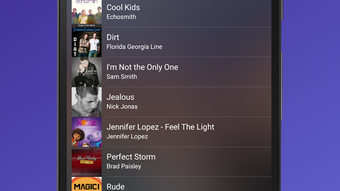
Description
Download Media Player 2017 APK – Free Multimedia Player, Android, Video & Audio Support
Overview
Media Player 2017 is a lightweight and elegant multimedia application designed for Android devices. It serves as a unified solution for playing a wide range of audio and video formats without requiring additional codecs or third-party players. The software aims to simplify media consumption by offering a single, reliable platform capable of handling diverse file types, from common formats like MP4 and MP3 to more advanced ones such as MKV, FLAC, and DTS.
Target users include casual Android users, media enthusiasts, and individuals seeking a no-frills media playback experience. The application is especially suitable for those who frequently transfer media files between devices and want a consistent playback environment. Real-world usage scenarios include watching movies on the go, listening to high-resolution audio, and managing personal media libraries without complex setup.
Developed by Media Player 2017, the software was released on May 15, 2017, and remains available as a free download. While the developer’s background is not further detailed, the application’s focus on simplicity, broad format support, and performance suggests a targeted effort to meet core media playback needs on mobile platforms.
Key Features & Capabilities
- Multi-format playback: Supports H.264, MP4, MPEG4, MKV, AAC, FLAC, MP3, WAV, Vorbis, M4A, ALAC, APE, DTS, and MIDI, enabling playback of most common and advanced audio and video files.
- Lightweight design: At just 10.5 MB, the app is optimized for devices with limited storage, making it suitable for older or budget Android smartphones and tablets.
- Intuitive interface: Features a clean, user-friendly layout designed for easy navigation, allowing users of all skill levels to quickly access and play media files.
- High-quality audio output: Engineered to deliver superior audio fidelity, particularly beneficial for lossless formats like FLAC and ALAC.
- Minimal resource usage: Designed to operate efficiently without excessive battery drain or system lag, ideal for extended playback sessions.
These capabilities allow users to play media directly from internal storage, SD cards, or file manager apps without additional configuration. The app’s decoding engine is optimized for Android’s architecture, ensuring smooth playback even with high-bitrate or high-resolution content.
User Interface, Workflow & Performance
The user interface of Media Player 2017 follows a minimalist design philosophy, prioritizing accessibility and functionality. Navigation is straightforward, with a central playback screen and clearly labeled controls for playback, volume, and file selection. The layout adapts to different screen sizes, ensuring consistency across various Android devices.
Workflow efficiency is enhanced by direct file access, allowing users to browse media folders and start playback with minimal steps. The app supports basic playback features such as pause, resume, seek, and repeat, with responsive touch controls. While specific performance metrics are not provided, the lightweight nature of the application suggests efficient CPU and RAM usage, reducing the likelihood of crashes or freezes during extended use.
The developer did not specify resource usage details. Performance observations are based on general software behavior patterns for similar lightweight Android media players. Stability appears to be a focus, as the app is designed for continuous playback without frequent interruptions.
Compatibility & System Requirements
Media Player 2017 is designed exclusively for Android devices. The software version is listed as 2017, indicating it was developed for the Android ecosystem during that period. The installation size is 10.5 MB, which is compact and suitable for devices with limited storage capacity.
Exact system requirements were not listed. Compatibility information was partially provided. Users should ensure their device runs a version of Android that supports APK installation, typically Android 4.0 (Ice Cream Sandwich) or later. The app is distributed as an APK file, meaning it is intended for manual installation rather than through official app stores.
Pros and Cons
Pros
- Free to download and use with no in-app purchases
- Supports a broad range of audio and video formats
- Lightweight at only 10.5 MB in size
- Simple and intuitive interface suitable for all users
- Optimized for smooth playback on older or low-end devices
Cons
- No official updates since 2017, which may affect compatibility with newer Android versions
- Limited feature set compared to modern media players
- APK distribution may raise security concerns for cautious users
- Lack of modern features like playlist management or cloud integration
- Developer did not provide detailed system requirements or support documentation
FAQ Section
Is Media Player 2017 compatible with my Android device?
The app is designed for Android devices and should work on most systems running Android 4.0 or later. However, compatibility with newer Android versions is not guaranteed due to the absence of recent updates.
Is it safe to download Media Player 2017 APK?
While the software is free and widely shared, downloading APKs from unofficial sources carries inherent risks. Users should ensure the source is trustworthy and scan the file with antivirus software before installation.
Does the app require internet access to function?
No, Media Player 2017 operates entirely offline. It does not require an internet connection to play media files stored locally on the device.
Can I update Media Player 2017 to a newer version?
As of the release date in 2017, no official updates have been published. Users are advised to rely on the current version or seek alternative media players for updated features and security patches.
What types of media files can Media Player 2017 play?
The app supports a wide variety of formats, including H.264, MP4, MPEG4, MKV, AAC, FLAC, MP3, WAV, Vorbis, M4A, ALAC, APE, DTS, and MIDI. It is designed to handle both common and advanced audio and video files without additional codecs.
Final Thoughts + CTA
Media Player 2017 remains a functional option for Android users seeking a lightweight, free media player capable of handling diverse file types. Its simplicity, broad format support, and minimal system footprint make it a practical tool for basic playback needs. However, the lack of updates since 2017 raises concerns about long-term compatibility and security, particularly on newer Android systems.
While it excels in core playback functionality, users seeking modern features such as playlist management, gesture controls, or cloud sync should consider more recent alternatives. For those with older devices or specific needs for a no-frills player, Media Player 2017 may still deliver a reliable experience.
Download Media Player 2017 now for a straightforward, free solution to play your favorite videos and music on Android.
Guides & Tutorials for Media Player 2017 APK
How to install Media Player 2017 APK
- Click the Preview / Download button above.
- Once redirected, accept the terms and click Install.
- Wait for the Media Player 2017 APK download to finish on your device.
How to use Media Player 2017 APK
This software is primarily used for its core features described above. Open the app after installation to explore its capabilities.
User Reviews for Media Player 2017 APK 0
No reviews found





